See which buttons people actually click.
WP Click Tracker counts clicks on any button or link on your WordPress site and shows you the numbers right in your dashboard. No cookies, no Tag Manager, no monthly fee.
One payment, one website. Updates included.
Hartley Plumbing & Heating
Boiler not working? We can usually be with you today.
Gas Safe engineers covering Leeds and Wakefield.
 Clicks today
-
Book a call
.book-call23 -
View prices
.view-prices9
Last click: Book a call on mobile, 4 minutes ago
Set up in about two minutes
-
Install the plugin
Upload the zip in Plugins → Add New, activate it and paste in your licence key.
-
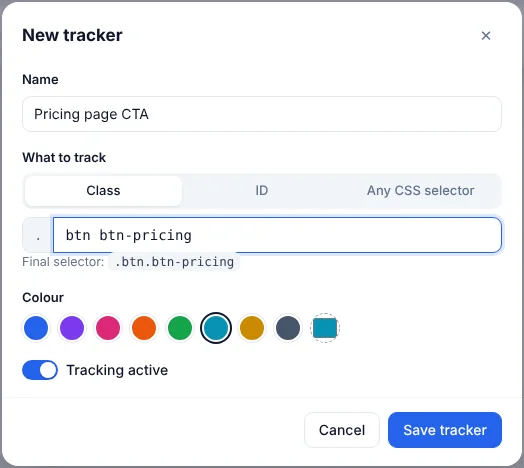
Tell it what to count
Give the tracker a name and the button’s class or ID, like
.book-now. You don’t edit your theme or add any code. -
Watch the clicks come in
Every click shows up on your dashboard within seconds, along with the page it happened on and the type of device.
Your clicks, in your WordPress dashboard
No new account to log into and nothing to export first. Open Click Tracker in your admin menu and the answers are there.
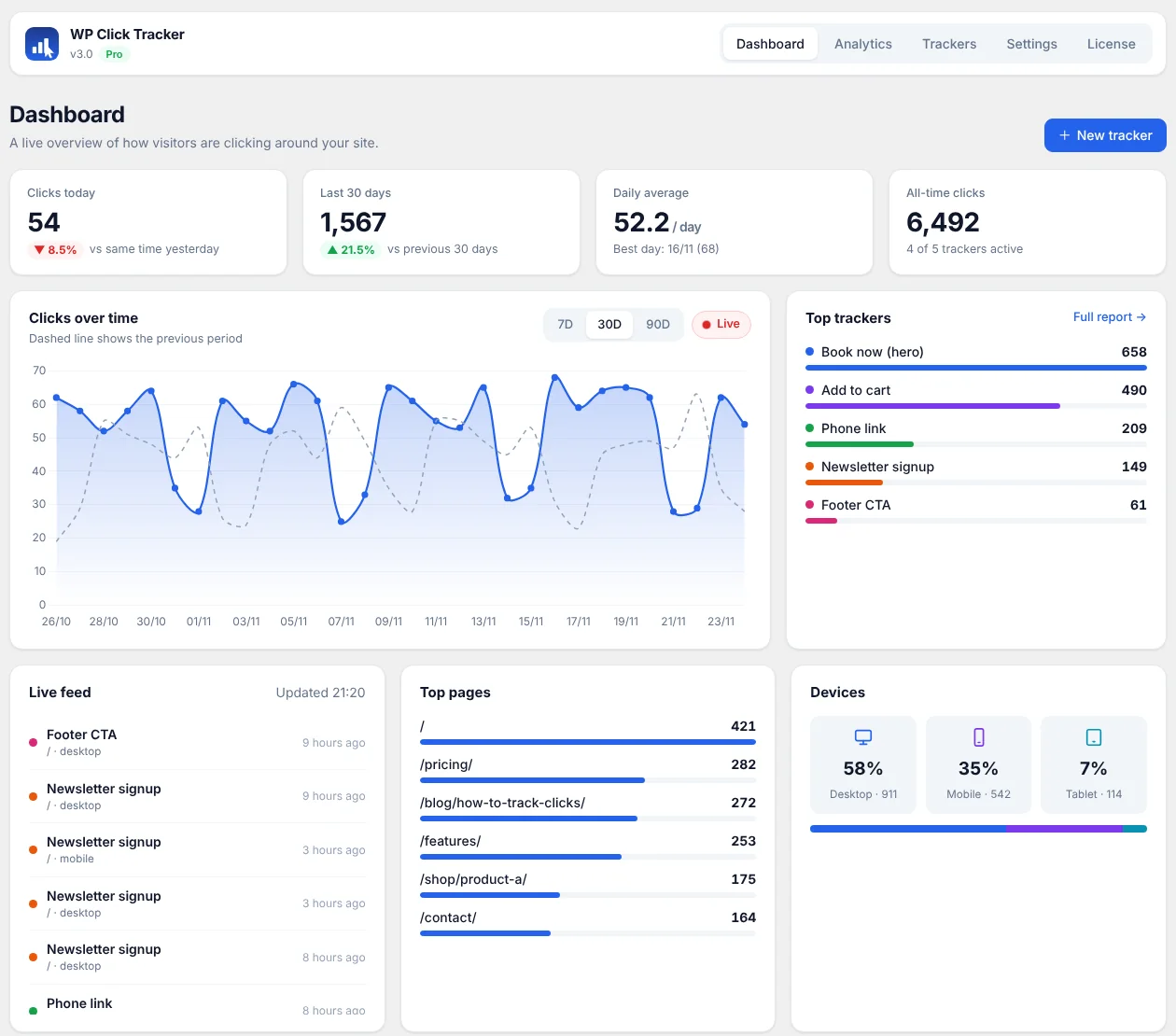
- A
- Clicks today, compared with the same time yesterday
- B
- The dashed line is the previous period, so you can see if a change helped
- C
- Your best and worst performing buttons at a glance
- D
- A live feed of clicks as they happen
- E
- Whether people click on desktop, mobile or tablet
What it does
- Tracks any button, link or element
- Use a class, an ID or any CSS selector.
a[href^="tel:"]counts every phone number tap on your site. - Compares every period
- Each number sits next to the period before it, so you know whether that new headline or button colour made a difference.
- Shows where and on what
- See which pages clicks come from and the split between desktop, mobile and tablet.
- Finds your busy hours
- A day-by-hour grid shows when people click, in your own time zone.
- Keeps the numbers clean
- Bots, your own admin clicks and accidental double clicks are left out.
- Exports to a spreadsheet
- Download a daily summary or every single click as a CSV file for Excel or Google Sheets.
- Works with what you’ve got
- Elementor, Divi, the block editor, WooCommerce, caching plugins, and links that take visitors to another page.
- Keeps your data on your site
- No cookies and no IP addresses. Clicks are stored in your own database and never sent to us.
Why not just use Google Analytics?
You can, and it’s free. It just takes more setup per button, it can’t count visitors who say no to cookies, and the results live somewhere else.
| Question | WP Click Tracker | GA4 click events |
|---|---|---|
| Setting up a button | Type its class or ID | A Tag Manager trigger and an event tag |
| Where you see the numbers | Your WordPress dashboard | Google Analytics reports |
| Visitors who decline cookies | Counted. No cookies are used. | Not counted |
| Where the data is kept | Your own database | Google’s servers |
| Traffic sources, campaigns and audiences | No, it counts clicks | Yes |
| Cost | £16.99, once | Free |
Plenty of sites use both: Google Analytics for where visitors come from, WP Click Tracker for what they do once they arrive.
One price, paid once
£16.99
Paid once, for one website.
No subscription and no renewal fee.
Card payment through Stripe. Your licence key and download are shown straight after payment and emailed to you.
What you get
- The full plugin, with every feature
- Unlimited trackers and unlimited clicks
- Updates through your WordPress dashboard
- Email help from the developer
- Move the licence when you change domain
- Your data stays in your own database
Questions people ask before buying
Something else? Ask the developer or read the full FAQ.
How does WP Click Tracker count clicks?
When you create a tracker, you give it a CSS selector such as .book-now. A tiny script (under 2 KB) on your site listens for clicks on anything that matches and sends each click to your own WordPress site, where it’s stored in your database. Nothing goes to us or to a third party.
Do I need to edit my theme or add any code?
No. You type the button’s class or ID into the tracker form and that’s it. If a button doesn’t have a useful class, you can add one in your page builder’s settings in a few seconds; here’s where to find it.
Does it work with Elementor, Divi and the block editor?
Yes. It works with any theme or page builder, because it only needs a CSS selector to match. Clicks on anything inside the matched element (an icon or text inside a button, for example) count as clicks on it.
Will it slow my site down?
No. The tracking script is under 2 KB, loads after the page, and only loads at all once you have an active tracker. Clicks are sent in the background, so a click on a link isn’t delayed and still gets counted when the visitor leaves the page.
Does it set cookies or store personal data?
No cookies, and no IP addresses or anything else that identifies a visitor. For each click it stores the time, which tracker, the page path and the device type (desktop, mobile or tablet). We’d still suggest mentioning click tracking in your privacy policy.
WP Click Tracker is built and supported by Luke Hemingway, a developer in the UK. When you get in touch, you’re talking to the person who writes the code.
Send a questionFind out which buttons are earning their place.
Set up in a couple of minutes. £16.99, paid once.
What happens when you buy
- Pay by card on a secure Stripe checkout. No account needed.
- Your licence key and download appear straight away, and arrive by email.
- Upload the plugin, paste in the key and create your first tracker.